Help guides
Answers to common problems while importing, editing, compiling, and using AI.
On this page
How to verify student status
Confirm a university-issued email in Account Settings, or verify your own CHSI enrollment or graduation report. Both methods qualify for the Student plan.
- Open Account Settings and add your university email. You can keep your current primary sign-in email.
- Use the confirmation email or six-digit code to confirm ownership. Adding an address without confirming it is insufficient.
- Alternatively, open China student verification and submit your own CHSI enrollment or graduation report code.
- Return to Change plan after verification to choose Student. Contact support if your university domain is unrecognized.
Never provide a CHSI password, identity number or photo. Your code is sent privately to the server and checked with CHSI; raw codes and names are not saved. Each report code can be linked to one account. Verification lasts up to one year and can be withdrawn on the verification page. A CAPTCHA or unavailable report never automatically passes.
An import loses formatting or images
Prefer DOCX when you have the editable original. Export a Google Doc as DOCX first. PDF often contains positioned text rather than a document structure, so review reading order, equations, tables, and extracted images.
Follow the import in the editor
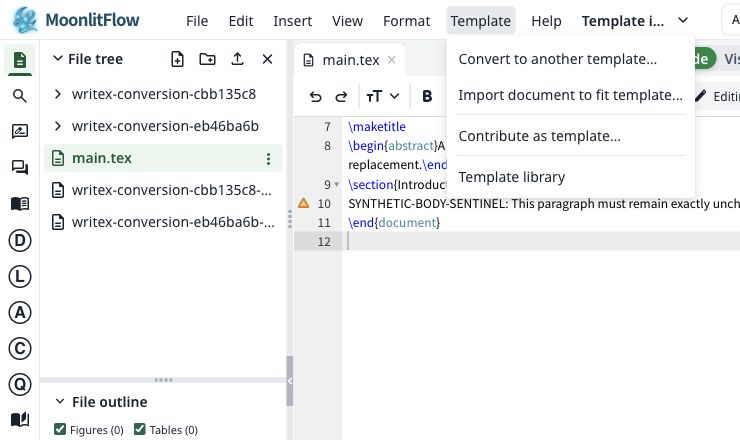
Choose Template → Import document to fit template… The existing project supplies the target style.
Choose a DOCX, PDF, or Markdown document. Confirm AI processing, then choose Convert and preview.
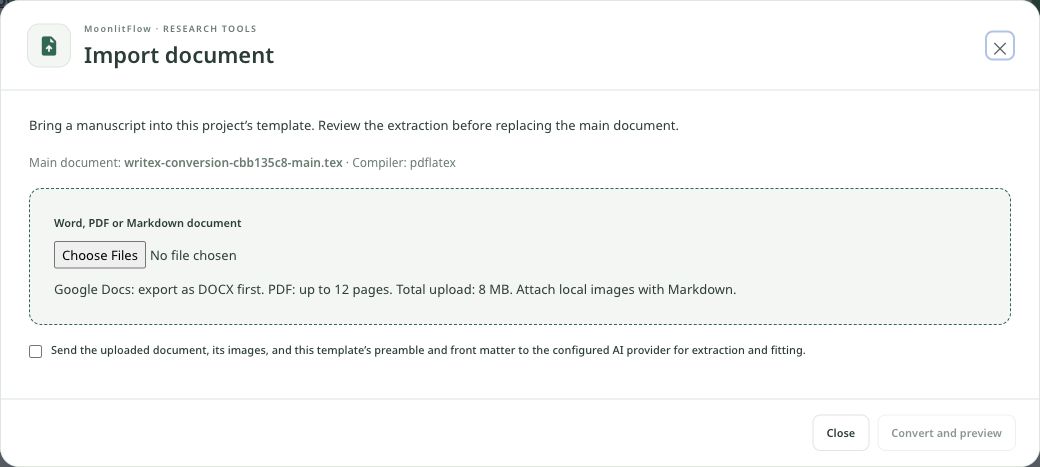
- Google Docs → export as DOCX
- PDF: up to 12 pages; uploads: up to 8 MB
- For Markdown, attach its local images
Inspect the extraction summary and LaTeX preview. Apply to the main document only after checking the content, then inspect the compiled result.
- Title, authors, and abstract
- Sections, figures, tables, and equations
- Citation keys and bibliography
A project does not compile
Confirm the main .tex file, compiler, and required template files in project settings. Read the first error in the compilation log. Fix missing files or syntax before chasing later errors. Use the wrench tool for AI diagnosis when needed.
Find the cause before changing the document
A citation shows a question mark
Check that the citation key exists in the project bibliography, that the .bib file is included using the template’s method, and that compilation completes. Imported library records must be copied into the project before the paper can use them.
Find the cause before changing the document
Live Preview is slow or starting
Check the connection and give the preview time to start. Confirm that the main file compiles. If the template uses unsupported preview features, switch Back to PDF and use regular compilation to inspect the final output. Live Preview does not require a paid plan.
Two ways to inspect the same manuscript
Manage email addresses and sign-in
In Account Settings, add and verify an email address before making it primary. If you sign in through a linked provider or an institution, use that provider to manage its password and access.
An AI tool is unavailable
Check your credit balance, account AI permissions, and provider configuration. Usage follows provider-reported tokens, not a fixed number of clicks. Monthly credits are used first; purchased and bonus credits carry over.