Use cases
Practical workflows from a first draft to a submission package. Choose the task you want to complete.
On this page
Write in Word. Submit in LaTeX.
Start with a completed Word or Google Docs manuscript and fit it into a journal, conference, thesis, or proposal template.
Follow the import in the editor
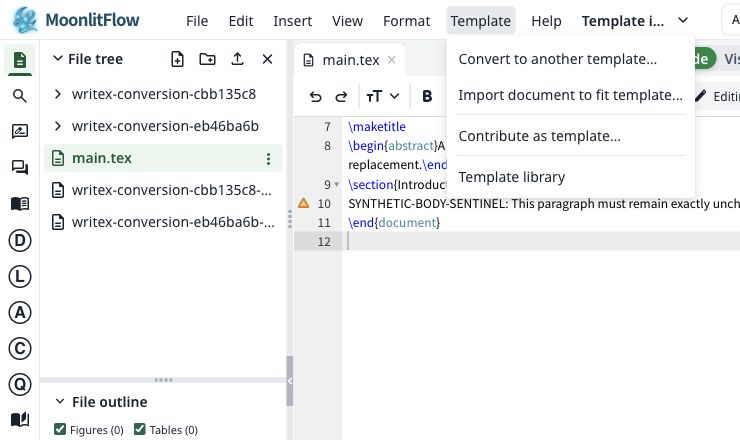
Choose Template → Import document to fit template… The existing project supplies the target style.
Choose a DOCX, PDF, or Markdown document. Confirm AI processing, then choose Convert and preview.
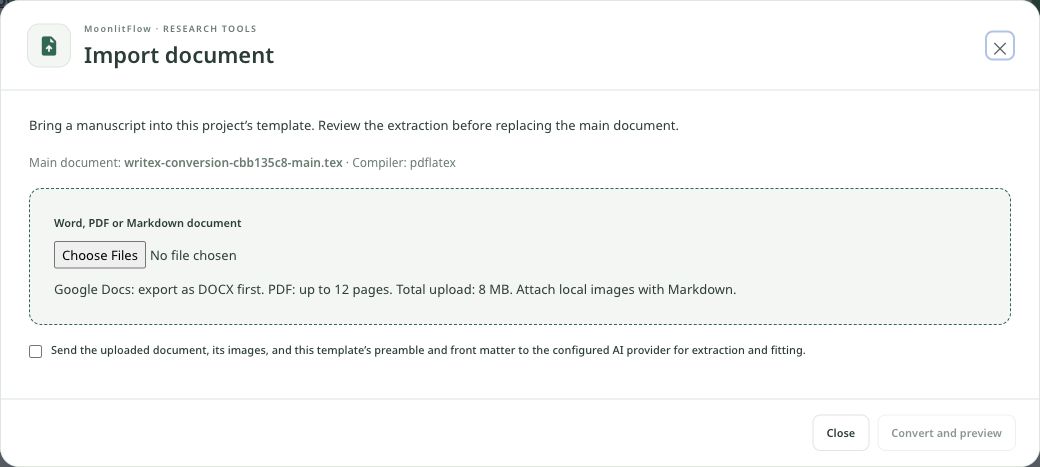
- Google Docs → export as DOCX
- PDF: up to 12 pages; uploads: up to 8 MB
- For Markdown, attach its local images
Inspect the extraction summary and LaTeX preview. Apply to the main document only after checking the content, then inspect the compiled result.
- Title, authors, and abstract
- Sections, figures, tables, and equations
- Citation keys and bibliography
- Choose a template from the template library and create a project. Set the intended main .tex file in project settings.
- Export Google Docs as .docx. In the project, choose Template → Import document to fit template… (also available under File → Import document…). Select a DOCX, PDF, or Markdown file.
- Confirm AI processing and choose Convert and preview. Review the extraction summary and LaTeX preview, then choose Apply to main document.
- Compile and compare the result with your original: title, authors, abstract, headings, equations, figures, tables, and references.
DOCX usually preserves more structure than PDF. PDF extraction, especially scanned pages, can lose reading order, equations, or figures. Keep the original and review the import report.
Add references where your argument needs them
Use AI to find relevant literature and suggest citations for a sentence or a wider research question.
From a claim to a checked citation
- Select a sentence and open the circled R tool for reference recommendations. Give enough context to identify the claim.
- For a literature-based introduction, open the L tool and describe the topic, scope, and research question.
- Review the recommended papers. Verify each title, author list, DOI, and whether the paper actually supports your statement.
- Import the chosen references into your library or project bibliography, insert citations, and compile to check that every citation resolves.
AI recommendations are suggestions, not verified evidence. Read the source and keep citation keys consistent.
Fit a paper to a page limit
Shorten and reorganize a draft while keeping its scientific meaning and required formatting.
Set the page budget, then review the changes
Open Format → Fit to page limit… Set Maximum pages and choose Compile & count to measure the actual PDF.
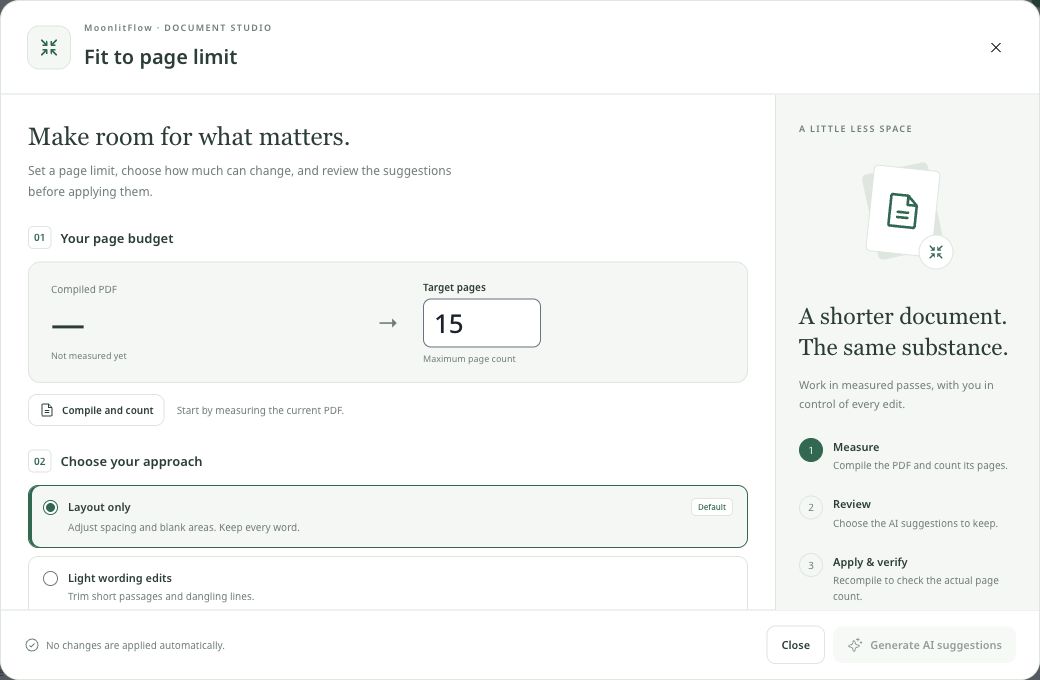
Choose layout only, light text trimming, or a larger rewrite. Expand Requirements and priorities to state what must remain.
Generate suggestions after measuring. Review the proposed edits, apply those you want, and compile again to verify the page count.
- Compile the current paper and note the page count. Check whether the venue counts references and appendices.
- Choose Format → Fit to page limit… Enter the target and explain which sections, results, and formatting requirements must be preserved.
- Review the suggested changes before applying them. Prioritize repetition, long sentences, and misplaced detail.
- Compile again to verify the actual page count. Check citations, equations, figure captions, and publisher rules.
AI cannot guarantee a final page count. Avoid reducing fonts or margins below the venue’s requirements.
Polish a manuscript without changing the findings
Use focused AI tools for grammar, abstract clarity, and a final quality inspection.
Read the quality report by severity
Illustrative issues, not a report about your manuscript
A central claim has no supporting result.
Suggested fix: Add evidence or narrow the claim.A figure is discussed without a clear caption.
Suggested fix: Explain the variables and what the figure establishes.The same term is spelled inconsistently.
Suggested fix: Use one spelling throughout.- Select a paragraph and open G for grammar checking and suggested fixes. Review changes to technical terms and numbers.
- Open A for abstract optimization. Compare the revision with your actual methods, results, and conclusions.
- Open Q for a pre-submission quality check. Work through Critical, Major, and Minor issues and their suggested fixes.
Review every AI edit. Do not introduce results, claims, or references that your manuscript does not support.
Move a paper to another journal template
Adapt an existing LaTeX manuscript to another template when the target journal changes.
Choose a target, then choose how to convert
- Choose Template → Convert to another template… and search or select a favorite template.
- Create a converted project to review a separate copy, or use In situ replacement to update the current project. Make a copy first if you need an independent backup.
- Review the converted preamble and front matter, then compile and check figures, bibliography style, and journal instructions.
Prepare clean source files for submission
Create a source package after the manuscript and references are ready.
A clean source package, step by step
- Confirm the main document in project settings. Run Q to review outstanding manuscript issues.
- Use the C tool to create a versioned clean main document with comments removed and included TeX content combined. Check the result before using it.
- For arXiv, choose File → Download → Download for arXiv. Review the package and compile the exported source before uploading.
A clean export does not certify compliance. Check the destination’s current source, bibliography, figure, and disclosure requirements.