Blog
Workflow notes for research writing with MoonlitFlow.
On this page
Draft first, typeset when you are ready
You do not need to learn every LaTeX command before writing a paper. Keep your argument in a familiar editor, choose a target template, and use document import to move into LaTeX when the draft is ready. Allow time to check tables, equations, and references after conversion.
Follow the import in the editor
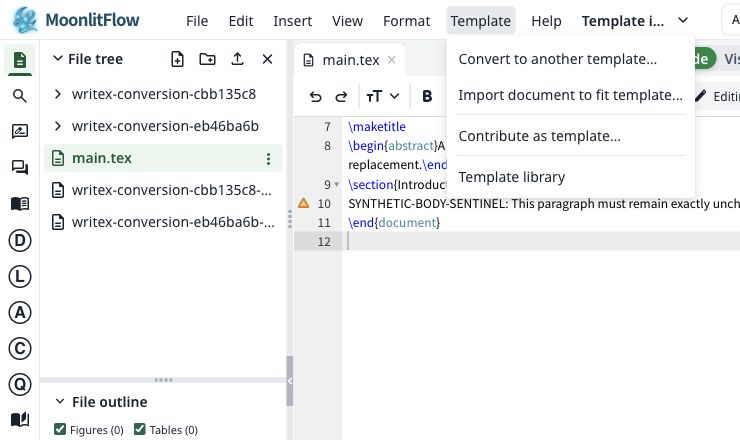
Choose Template → Import document to fit template… The existing project supplies the target style.
Choose a DOCX, PDF, or Markdown document. Confirm AI processing, then choose Convert and preview.
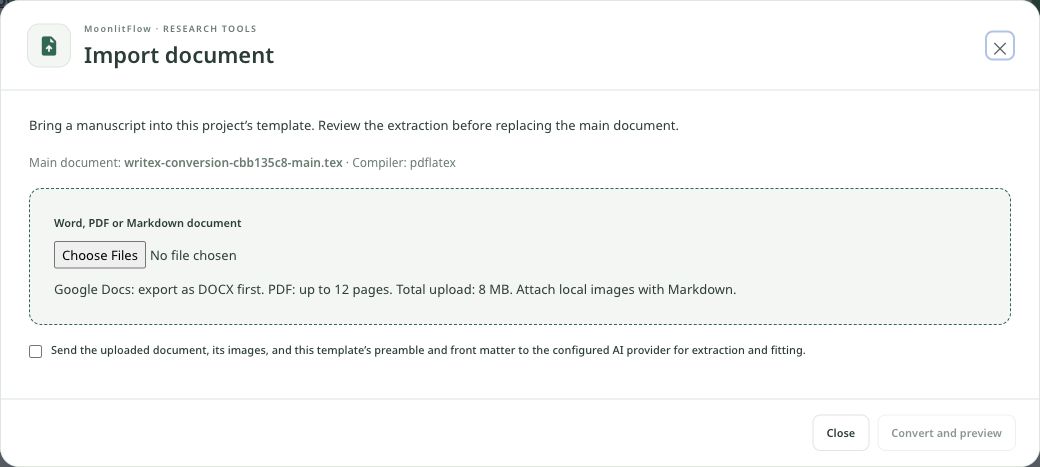
- Google Docs → export as DOCX
- PDF: up to 12 pages; uploads: up to 8 MB
- For Markdown, attach its local images
Inspect the extraction summary and LaTeX preview. Apply to the main document only after checking the content, then inspect the compiled result.
- Title, authors, and abstract
- Sections, figures, tables, and equations
- Citation keys and bibliography
Citations belong to claims
A long reference list does not guarantee a well-supported argument. Start with the sentence that needs evidence, use recommendations to identify candidate sources, and read the relevant passage before adding a citation.
From a claim to a checked citation
Make a shorter paper easier to read
Page-limit work is a revision task. Remove repeated context, shorten long sentences, and move detail only when the venue allows it. Compile after each meaningful revision so the page count reflects the real template.