Your Next Paper Belongs in Wordex

You have a paragraph to improve, an equation to explain, and a deadline to meet. Opening the manuscript should put that work in front of you.
That is the case for Wordex at MoonlitFlow: a visual writing experience for a real LaTeX project. Work with supported manuscript content directly. Keep the source available. Check the compiled paper beside your work.
Word. LaTeX. Overleaf. Murfy. These names often frame the conversation about academic writing. Wordex puts a specific experience at the center of the decision: editing your research visually while retaining a LaTeX manuscript.
Publication formats are changing
ACL Rolling Review announced that submissions based on its Microsoft Word template would be desk-rejected starting in March 2026. Its announcement discusses differences in layout and the additional processing burden those differences created. Read ARR’s announcement.
That is a requirement for a particular reviewing service, not a rule for every discipline. It does illustrate a practical question: when your venue expects a LaTeX-based manuscript, how will your team write and revise it?
Wordex gives you a visual route into that workflow. LaTeX can remain your document source while much of the everyday editing happens on formatted content.
Write where the paper is readable
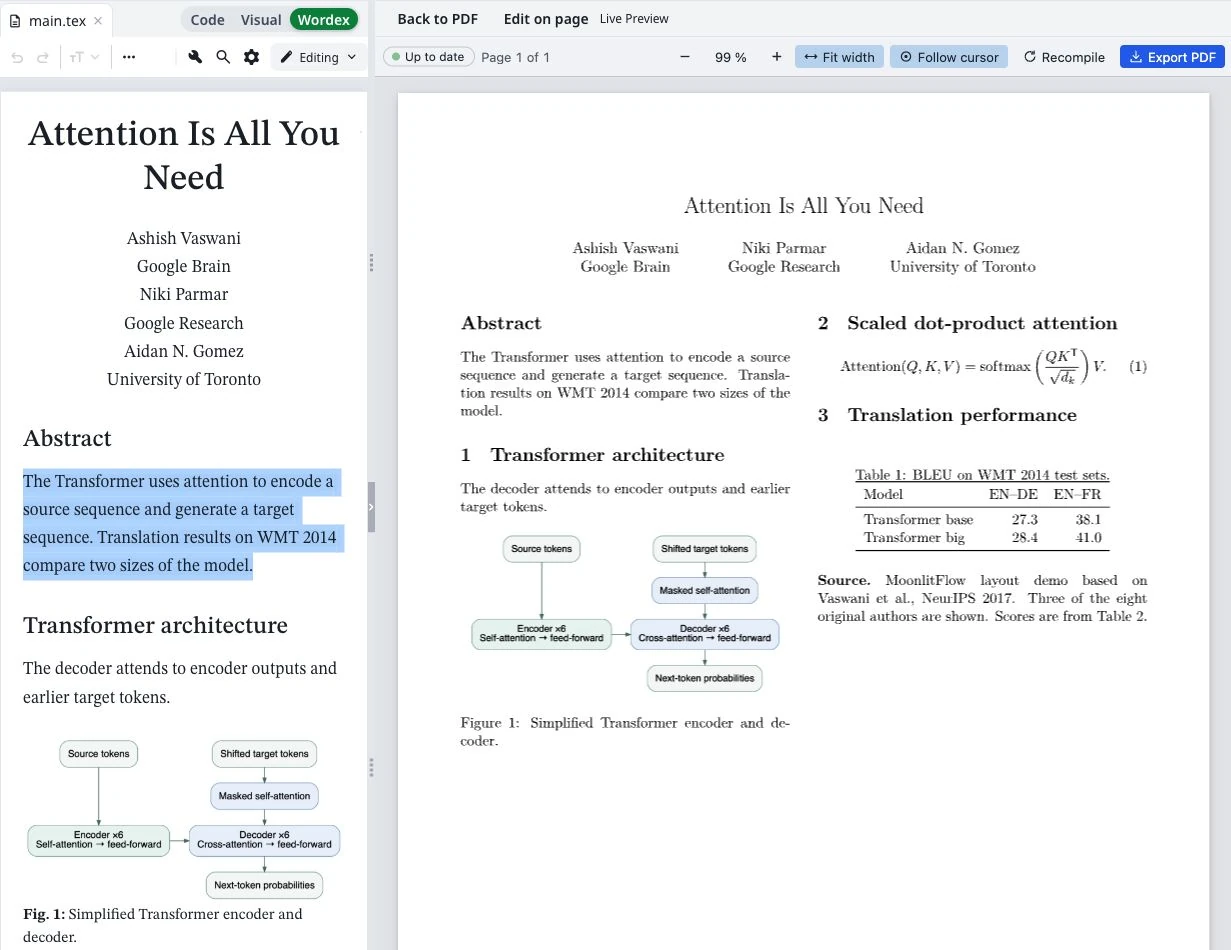
In Wordex, you can work with supported headings, paragraphs, equations, tables, figures, and citations through a word-processing-style interface. You can focus on a sentence’s meaning, adjust a heading, or revise a caption while the project retains its LaTeX structure.
The benefit is particularly concrete in mixed-experience teams. One researcher may prefer source code. Another may contribute the strongest discussion edits through a formatted view. Wordex and Code offer different ways to work on the same project.
You can choose the interface that suits the task. Routine prose revision can happen visually. A specialized package setting can be handled in Code.
Keep the source you will need later
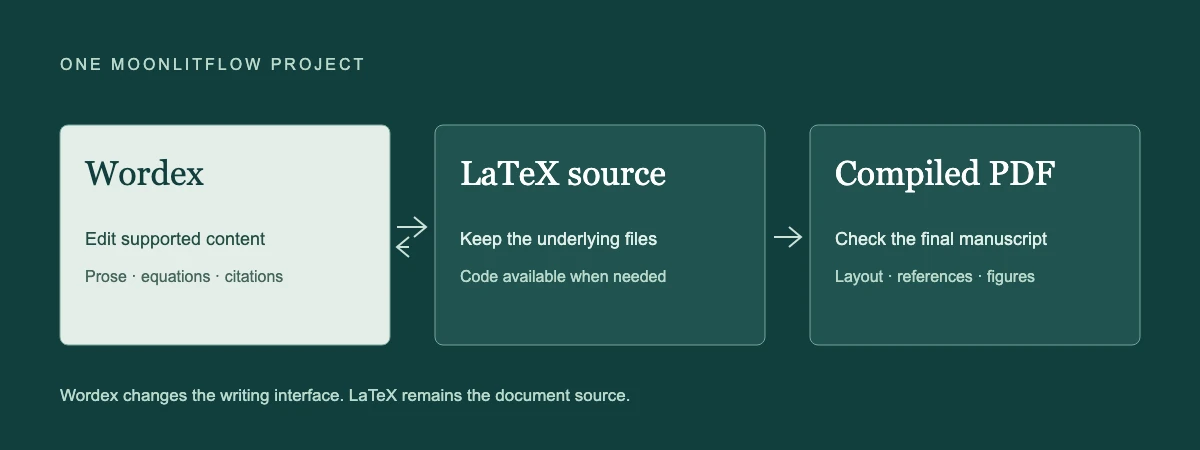
A manuscript is more than its visible paragraphs. It includes labels, citations, equations, figures, bibliography files, and the template that brings them together.
Wordex writes supported edits back into the LaTeX source. This can reduce the need to keep a Word version for drafting and a separate LaTeX version for submission, with someone responsible for reconciling them after every revision.
Keeping LaTeX underneath also leaves room for advanced work. Your project can retain its document class and supporting files, and the source remains available when you need to inspect a command or make a precise adjustment.
Bring AI into a reviewable writing process
MoonlitFlow’s AI assistant includes grammar checking, paraphrasing, and translation alongside the editor. You can choose a sentence, paragraph, or whole-document translation task and specify the target language.
For a researcher, the useful workflow is specific: identify a passage, request an improvement, inspect the proposed wording, and check that the scientific meaning survives. Treat every AI result as a draft. Verify citations, numerical claims, terminology, and the relationship between the text and your results.
A smoother interface should give you more attention for those decisions. It should not make them for you.
What switching to Wordex means
Switching to Wordex means choosing MoonlitFlow’s visual editor for a LaTeX project. It does not require abandoning the source, and it does not turn Wordex into a separate submission format.
It also does not mean every custom LaTeX command becomes visually editable. Some class-specific constructs and advanced package settings still need Code. The compiled PDF remains the place to verify the final layout and submission details.
Other writing tools offer useful capabilities, including visual editing and AI assistance. The case for Wordex rests on the combination available in your MoonlitFlow project: visual manuscript editing, accessible LaTeX source, a compiled preview, and academic writing tools alongside the work.
Try Wordex on a real revision
Open a representative manuscript or a suitable template in MoonlitFlow. Select Wordex in the editor. Revise a paragraph, inspect an equation, and check a citation. Switch to Code to see the corresponding source, then inspect the compiled PDF.
That small exercise tells you more than a feature checklist. It shows whether Wordex fits the way you and your collaborators actually work.
Your next paper needs your ideas, your evidence, and your judgment. Give them a writing workspace built around the manuscript.
Further reading: Word vs. LaTeX vs. Wordex: Which Should Researchers Use in 2026? · How to Move from Word to Wordex: A Practical MoonlitFlow Guide.